
11.1 Hands-On: Train a VLM to Answer Visual Questions with GRPO
In Chapter 8 we ran GRPO training on a text-only model for math reasoning -- give the model a math problem, let it generate multiple reasoning paths, use rule rewards (whether the answer is correct) to compute group-relative advantages, then update the policy. Now we are going to do something even more interesting: give the model an image and a question about the image, and have it "look", "think", then "answer."
The core difference in this experiment is the input: pure-text GRPO input is a sequence of tokens, while VLM GRPO input is visual tokens (image encoding) + text tokens (question). The reward function and optimization algorithm itself have not changed -- GRPO's core code is exactly the same, except the model input now has an additional image dimension.
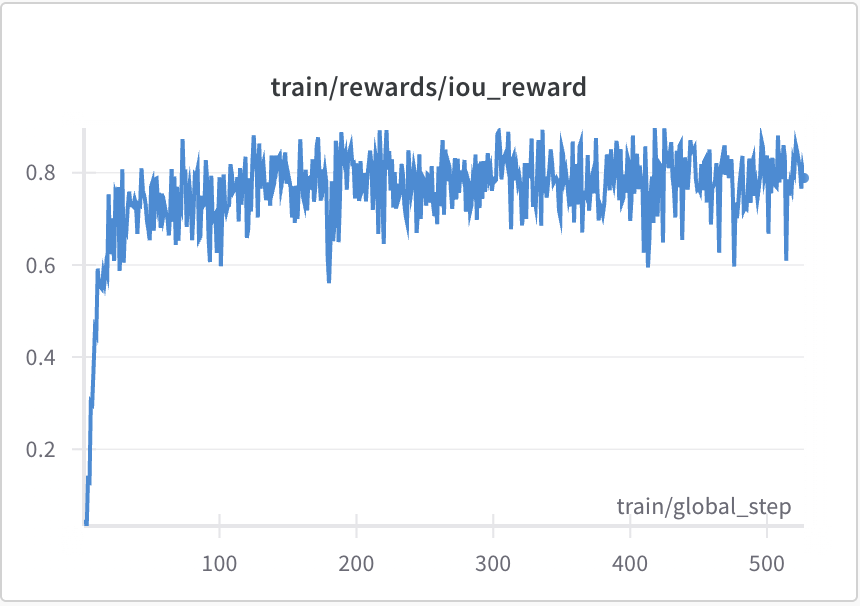
The value of this figure is not in how pretty the curve looks, but in reminding us that VLM RL is not simply "adding a few tokens to an image." As long as the reward can capture visual grounding quality, GRPO can turn "looking at the right places" into an optimizable training signal. The geometric shape counting experiment below is the minimal version of this idea.
11.1.1 Dataset: Geometric Shape Counting
We chose a simple visual question-answering task: geometric shape counting. The advantage of this task is that it has objectively correct answers that can be evaluated with rule rewards, requiring no additional RM training.
Each image contains several basic geometric shapes (triangles, circles, squares). Questions are of the form "How many circles are in the image?" The model's ideal response process is: first describe what it sees ("I see 3 triangles, 2 circles, and 1 square in the image"), then reason to the answer ("So the number of circles is 2").
# ==========================================
# Dataset: Geometric shape counting
# ==========================================
from datasets import Dataset
import random

def generate_shape_image(num_triangles, num_circles, num_squares, seed=None):
    """Generate an image containing a specified number of geometric shapes."""
    from PIL import Image, ImageDraw

    if seed is not None:
        random.seed(seed)

    img = Image.new('RGB', (256, 256), 'white')
    draw = ImageDraw.Draw(img)

    # Randomly place triangles
    for _ in range(num_triangles):
        x, y = random.randint(20, 236), random.randint(20, 236)
        size = random.randint(15, 35)
        draw.polygon([(x, y - size), (x - size, y + size), (x + size, y + size)],
                     fill='red', outline='darkred')

    # Randomly place circles
    for _ in range(num_circles):
        x, y = random.randint(20, 236), random.randint(20, 236)
        r = random.randint(10, 25)
        draw.ellipse([(x - r, y - r), (x + r, y + r)],
                     fill='blue', outline='darkblue')

    # Randomly place squares
    for _ in range(num_squares):
        x, y = random.randint(20, 236), random.randint(20, 236)
        s = random.randint(12, 28)
        draw.rectangle([(x - s, y - s), (x + s, y + s)],
                       fill='green', outline='darkgreen')

    return img


def generate_dataset(num_samples=500):
    """Generate a geometric shape counting dataset."""
    data = []
    for i in range(num_samples):
        # Randomly generate 1-5 of each shape
        n_tri = random.randint(1, 5)
        n_cir = random.randint(1, 5)
        n_sqr = random.randint(1, 5)

        img = generate_shape_image(n_tri, n_cir, n_sqr, seed=i)

        # Randomly choose a question
        questions = [
            f"How many triangles are in the image?",
            f"How many circles are in the image?",
            f"How many squares are in the image?",
        ]
        answers = [str(n_tri), str(n_cir), str(n_sqr)]
        q_idx = random.randint(0, 2)

        data.append({
            'image': img,
            'question': questions[q_idx],
            'answer': answers[q_idx],
            'ground_truth': {
                'triangles': n_tri,
                'circles': n_cir,
                'squares': n_sqr,
            }
        })

    return Dataset.from_list(data)

# Generate training and validation sets
train_dataset = generate_dataset(500)
val_dataset = generate_dataset(100)
11.1.2 Reward Design: Three-Dimensional Evaluation
The reward function for this task has three dimensions, each with clear scoring criteria:
| Reward dimension | Score | Evaluation criteria | Type |
|---|---|---|---|
| Correctness | +1.0 | Final answer matches ground truth | Rule reward |
| Reasoning quality | +0.5 | Response includes description of image content | Rule reward |
| Format compliance | +0.2 | Response follows "describe -> reason -> answer" format | Rule reward |
The thinking behind this reward design: correct answers are most important (+1.0), but we do not just want a model that "guesses correctly" -- we want a complete "look at image -> describe -> reason -> answer" chain. So reasoning quality (+0.5) and format compliance (+0.2) serve as auxiliary rewards, guiding the model to form correct reasoning habits.
# ==========================================
# Reward function: Three-dimensional evaluation
# ==========================================
import re

def compute_reward(response, ground_truth, target_shape):
    """
    Compute three-dimensional reward score.
    - response: model-generated answer
    - ground_truth: {'triangles': n, 'circles': n, 'squares': n}
    - target_shape: target shape for this question ('triangles'/'circles'/'squares')
    """
    reward = 0.0

    # 1. Correctness reward: extract final answer, check if correct
    correct_answer = str(ground_truth[target_shape])
    # Try to extract number from end of response
    numbers = re.findall(r'\d+', response)
    if numbers and numbers[-1] == correct_answer:
        reward += 1.0

    # 2. Reasoning quality reward: check if image content is described
    shape_keywords = {
        'triangles': ['triangle', 'red', 'triangular'],
        'circles': ['circle', 'blue', 'circular'],
        'squares': ['square', 'green', 'rectangular'],
    }
    has_description = any(kw in response.lower() for kw in shape_keywords[target_shape])
    if has_description:
        reward += 0.5

    # 3. Format compliance reward: check if reasoning keywords are included
    reasoning_keywords = ['therefore', 'so', 'total', 'the count is', 'the answer is']
    has_reasoning = any(kw in response.lower() for kw in reasoning_keywords)
    if has_reasoning:
        reward += 0.2

    return reward
11.1.3 Before-and-After Training Comparison
Before training, the model's typical response is "guessing" -- because it has not learned the "look first, then reason" strategy. After training, the model learns to describe image content first, then derive the answer from the description. Let us see how the GRPO training process achieves this transition.
# ==========================================
# VLM GRPO training loop
# ==========================================
def vlm_grpo_train(model, tokenizer, dataset, num_epochs=3, group_size=4, lr=1e-6):
    """
    Train VLM with GRPO.
    - group_size: how many responses to generate per prompt (for within-group comparison)
    """
    optimizer = torch.optim.AdamW(model.parameters(), lr=lr)
    normalizer = RewardNormalizer()

    for epoch in range(num_epochs):
        for batch in DataLoader(dataset, batch_size=8):
            all_log_probs = []
            all_rewards = []

            for prompt_img, prompt_text, ground_truth, target_shape in batch:
                # Generate group_size responses per prompt
                group_responses = []
                group_log_probs = []
                group_rewards = []

                for _ in range(group_size):
                    # VLM forward pass: input image + text
                    response, log_prob = model.generate_with_log_prob(
                        image=prompt_img,
                        text=prompt_text,
                        max_new_tokens=128,
                        temperature=0.8
                    )

                    # Compute reward
                    reward = compute_reward(response, ground_truth, target_shape)

                    group_responses.append(response)
                    group_log_probs.append(log_prob)
                    group_rewards.append(reward)

                all_log_probs.append(group_log_probs)
                all_rewards.append(group_rewards)

            # GRPO core: compute group-relative advantages
            # Recall Chapter 8: Advantage = (R_i - mean) / std
            rewards_tensor = torch.tensor(all_rewards)
            mean_r = rewards_tensor.mean(dim=-1, keepdim=True)
            std_r = rewards_tensor.std(dim=-1, keepdim=True) + 1e-8
            advantages = (rewards_tensor - mean_r) / std_r

            # Policy gradient loss
            log_probs_tensor = torch.stack([torch.stack(lp) for lp in all_log_probs])
            loss = -(log_probs_tensor * advantages.detach()).mean()

            # Add KL penalty (recall Chapter 8)
            kl_penalty = compute_kl_penalty(model, ref_model, batch)
            loss = loss + 0.05 * kl_penalty

            optimizer.zero_grad()
            loss.backward()
            torch.nn.utils.clip_grad_norm_(model.parameters(), max_norm=1.0)
            optimizer.step()
The before-and-after comparison is very intuitive. Before training, the model's answer to "How many circles are in the image?" might be:
Before training: "3." (pure guess, no image-reading process)
After training, the model's answer becomes:
After training: "I see 2 red triangles, 3 blue circles, and 1 green square in the image. The question is about the number of circles. So the number of circles is 3."
The model has learned to describe visual content first, then derive the answer from the description. This is exactly the behavior we guided through the reasoning quality reward (+0.5) and format compliance reward (+0.2).
11.1.4 Training Metric Analysis
When training a VLM, in addition to the standard metrics mentioned in Chapter 8 (reward, KL divergence, response length), there are several multimodal-specific metrics worth monitoring:
Attention heatmap changes. The VLM's attention mechanism determines which regions of the image the model "looks at." Before training, attention may be scattered across the entire image; after training, attention should concentrate on the shapes relevant to the question. You can verify this by visualizing attention heatmaps -- if asked "how many circles," attention should focus on the blue circle regions.
Relationship between reasoning length and accuracy. Track the relationship between the length of the reasoning portion in responses and final answer accuracy. The ideal pattern is an inverted U-curve -- moderate reasoning length works best. Too short means the model did not carefully examine the image (guessing answers); too long may mean the model is "overthinking" or even producing visual hallucinations.
Cross-generalization testing. Test the model's performance on new shape combinations outside the training set. If the model has truly learned the "look and count" capability, it should answer correctly on never-before-seen shape combinations -- for example, training used at most 5 shapes per type, but testing with 7.
Exercise: Why is the learning rate for VLM GRPO (1e-6) in a narrower range than for pure-text GRPO (typically 5e-7 to 1e-5)?
VLM contains two components -- a vision encoder (ViT) and a text decoder (Transformer). If the learning rate is too large, RL gradients may destroy the features the vision encoder has already learned (image understanding ability), causing the model to "go blind" -- it still outputs text but can no longer "understand" images. If the learning rate is too small, the text decoder's policy updates are too slow, making training extremely inefficient.
In practice, a common approach is to use different learning rates for the vision encoder and text decoder -- the vision encoder gets a smaller learning rate (e.g., 1/10 of the text decoder's), or the vision encoder is completely frozen. This preserves visual understanding ability while allowing the text generation component to fully optimize through RL. The next section will discuss this strategy choice in detail.
This experiment is simple, but it demonstrates the core VLM RL workflow: the algorithm is exactly the same as pure-text RL (GRPO), but the input now includes images, and reward evaluation needs to account for visual understanding dimensions. Next, we will dive deeper into what new challenges arise when input goes from pure text to "image + text" that simply do not exist in pure-text scenarios -- Special Challenges in VLM RL.
References
- VLM-R1 GitHub -- Provides VLM-R1 training curves, grounding reward examples, and open-source implementation; can serve as a real-world reference for the experiment in this section.