
11.5 Hands-On: Train GeoQA Geometry Reasoning with EasyR1
In Section 11.1 we wrote a VLM GRPO training loop by hand -- a few dozen lines of code running on synthetic data. In this section we change posture: we use the industrial-grade framework EasyR1 to train a VLM for geometry reasoning on the real dataset GeoQA-8K.
The handwritten loop helps you understand the principles; EasyR1 helps you run real experiments. The relationship between the two is similar to hand-writing CartPole in Chapter 1 versus using Stable Baselines3 -- the algorithm is the same, but the framework handles distributed training, memory optimization, data pipeline management, and other engineering details.
EasyR1 Overview
EasyR1 (4900+ stars) is developed by hiyouga and built on top of veRL. Compared to using veRL directly, EasyR1's core value-adds:
| Feature | Original veRL | EasyR1 |
|---|---|---|
| VLM support | Requires custom adaptation | Native support for Qwen2-VL / Qwen3-VL and other multimodal models |
| LoRA | Not built in | Built-in LoRA, enable with one config line |
| Padding | Standard padding | Padding-free training, reducing wasted token computation |
| Configuration | Python code | YAML + CLI dot overrides, no code changes needed |
| Algorithms | PPO | GRPO / DAPO / REINFORCE++ / ReMax / RLOO and 7 total |
| Reward function | Requires implementing the veRL interface | Plain Python file, just define compute_score() |
| Docker | User assembled | Prebuilt images, pull and run |
EasyR1's project structure:
EasyR1/
├── verl/                        # Core framework (based on veRL fork)
│   ├── trainer/
│   │   ├── main.py              # Entry: OmegaConf parses config → launches Ray
│   │   ├── config.py            # PPOConfig / DataConfig / AlgorithmConfig
│   │   ├── core_algos.py        # All advantage estimators and policy loss functions
│   │   └── ray_trainer.py       # RayPPOTrainer (RL training main loop)
│   ├── workers/
│   │   ├── actor/               # Training worker (FSDP + LoRA)
│   │   ├── rollout/             # Inference worker (vLLM SPMD)
│   │   ├── reward/              # Reward computation worker
│   │   └── sharding_manager/    # FSDP + Ulysses parallelism
│   └── utils/
│       └── dataset.py           # RLHFDataset (data loading and preprocessing)
├── examples/
│   ├── config.yaml              # Full default configuration (all fields and comments)
│   ├── baselines/               # Training scripts for each model/dataset
│   ├── reward_function/         # Reward function examples
│   └── format_prompt/           # Jinja2 prompt templates
└── scripts/
    └── model_merger.py          # Merge checkpoints into HF format
This structure looks complex, but as a user you only need to care about three directories: examples/ (config and scripts), examples/reward_function/ (reward functions), and examples/format_prompt/ (prompt templates). The rest of the framework works behind the scenes.
Why GeoQA
GeoQA-8K is an elementary geometry QA dataset. Each sample contains a geometry diagram, a Chinese question, and a ground-truth answer.
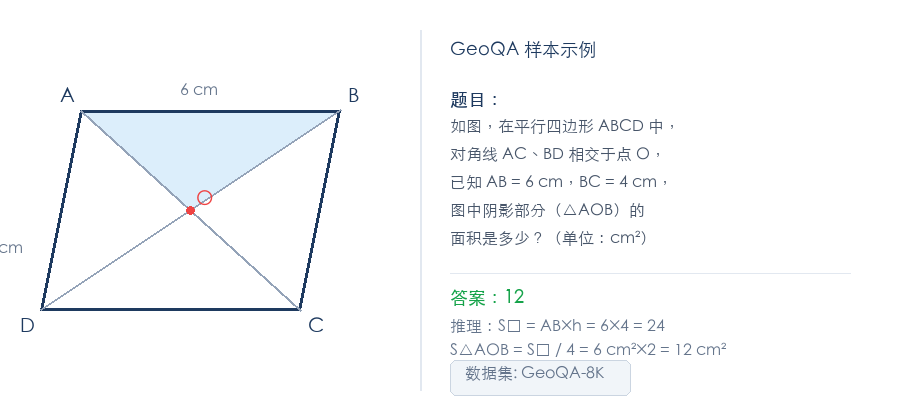
It is suitable as a VLM RL experiment for three reasons:
- Natural rule reward -- whether the answer matches can be verified automatically, no need to train an additional Reward Model
- Non-trivial visual reasoning -- the model cannot just OCR the text; it must understand spatial relationships in the diagram (angles, areas, symmetry)
- Community-verified -- EasyR1 provides complete GeoQA-8K training scripts and baseline results
Environment Setup
Install EasyR1
Docker is recommended (simplest, includes all vLLM + veRL + EasyR1 dependencies):
# Pull the prebuilt image
docker pull hiyouga/verl:ngc-th2.8.0-cu12.9-vllm0.11.0

# Start a container, mounting data and model directories
docker run -it --ipc=host --gpus=all \
  -v /path/to/data:/data \
  -v /path/to/models:/models \
  hiyouga/verl:ngc-th2.8.0-cu12.9-vllm0.11.0
Or install from source:
git clone https://github.com/hiyouga/EasyR1.git
cd EasyR1
pip install -e ".[vllm]"
After installation, EasyR1's training entry point is python3 -m verl.tainer.main. You do not need an additional pip install easyr1 -- it runs directly as a Python module.
Dataset
GeoQA-8K has been uploaded to Hugging Face. EasyR1 can load it directly from the Hub without manual download:
Dataset: leonardPKU/GEOQA_8K_R1V
Training split: leonardPKU/GEOQA_8K_R1V@train
Validation split: leonardPKU/GEOQA_8K_R1V@test
The part after @ is the Hugging Face dataset split name. EasyR1's RLHFDataset automatically calls load_dataset() to download and cache.
Each sample in the dataset contains three fields:
{
  "problem": "As shown, in parallelogram ABCD, diagonals AC and BD intersect at point O. What is the area of the shaded region? (unit: cm²) <image>",
  "answer": "12",
  "images": ["<PIL Image bytes>"]
}
Note several key points:
problemfield contains the question text, where the<image>placeholder marks the image insertion positionanswerfield is the ground-truth answer string; the reward function receives it through theground_truthparameterimagesfield is a list of images (in bytes format), supporting multi-image input
EasyR1 internally replaces the <image> placeholder with visual tokens, constructing a standard multimodal messages format:
[{"role": "user", "content": [
    {"type": "text", "text": "As shown, in parallelogram ABCD..."},
    {"type": "image"},
]}]
You do not need to construct messages manually -- just put the <image> marker in the problem field, and the framework handles the rest.
Prompt Template
EasyR1 uses Jinja2 templates to wrap raw prompts, standardizing the model's input/output format. GeoQA-8K uses an R1-V style template:
{# examples/format_prompt/r1v.jinja (simplified version) #}
{{ content | trim }}
You FIRST think about the reasoning process as an internal monologue
and then provide the final answer.
The reasoning process MUST BE enclosed within <thinkutan> </thinkutan> tags.
The final answer MUST BE put in <answer> </answer> tags.
This template does two things:
- It appends format instructions after the original question, telling the model to wrap the reasoning process with
<thinkutan>...</thinkutan>and the final answer with<answer>...</answer> - The template variable
is replaced with the content from the dataset'sproblemfield (including the<image>placeholder)
After template rendering, the model's actual input looks like:
As shown, in parallelogram ABCD... <image>
You FIRST think about the reasoning process...
The reasoning process MUST BE enclosed within <thinkutan> </thinkutan> tags.
The final answer MUST BE put in <answer> </answer> tags.
Why is the template simplified here?
The original EasyR1 r1v.jinja uses <thinkutan> / </thinkutan> as reasoning tags -- this is the original design from the R1-V paper, using an uncommon tag name to avoid conflicts with the model's pretrained knowledge. However, the original r1v.py's format_reward regex </think\s*> cannot match </thinkutan> (because the Chinese character is not whitespace), so the format reward is always effectively 0. This section uses a simplified template to keep the tags and regex consistent. If you run the official EasyR1 scripts directly, you will see the original <thinkutan> tags -- the code does not need modification and training still works (the format_reward signal just becomes inactive, and overall reward degrades to pure accuracy).
Reward Design
EasyR1's reward function is simply a plain Python file. The framework loads it dynamically via importlib, requiring no registration or decorators. The official reward function for GeoQA-8K is as follows:
# examples/reward_function/r1v.py

import re
from typing import Any
from mathruler.grader import grade_answer

# Metadata: tell the framework the reward name and processing mode
REWARD_NAME = "r1v"          # Name shown in logs
REWARD_TYPE = "sequential"   # Process one at a time (vs "batch" for batch processing)


def format_reward(response: str) -> float:
    """Check whether the response follows <thinkutan>...</thinkutan><answer>...</answer> format"""
    pattern = re.compile(
        r"<thinkutan>.*?</thinkutan>\s*<answer>.*?</answer>", re.DOTALL
    )
    return 1.0 if re.fullmatch(pattern, response) else 0.0


def accuracy_reward(response: str, ground_truth: str) -> float:
    """Check whether the answer is correct, using mathruler's numerical equivalence"""
    try:
        content_match = re.search(r"<answer>(.*?)</answer>", response)
        given_answer = (
            content_match.group(1).strip() if content_match else response.strip()
        )
        if grade_answer(given_answer, ground_truth.strip()):
            return 1.0
    except Exception:
        pass
    return 0.0


def compute_score(
    reward_input: dict[str, Any], format_weight: float = 0.5
) -> dict[str, float]:
    """
    Main reward function. The framework automatically passes in the reward_input dict.

    Args:
        reward_input: {
            "response": str,          # Model-generated answer (special tokens removed)
            "response_length": int,   # Token count
            "ground_truth": str,      # The answer field from the dataset
        }
        format_weight: Weight of the format reward (can be overridden via YAML config)

    Returns:
        {"overall": float, "format": float, "accuracy": float}
        overall is the total reward used by GRPO; format and accuracy are auxiliary
        metrics logged for monitoring.
    """
    format_score = format_reward(reward_input["response"])
    accuracy_score = accuracy_reward(
        reward_input["response"], reward_input["ground_truth"]
    )
    return {
        "overall": (1 - format_weight) * accuracy_score + format_weight * format_score,
        "format": format_score,
        "accuracy": accuracy_score,
    }
The design rationale for this reward function:
Format reward (format_reward): checks whether the model includes both a <thinkutan> reasoning segment and an <answer> answer segment. The weight is format_weight (default 0.5), meaning it accounts for half of the total reward. This ratio is much higher than in pure-text math reasoning (math.py defaults to 0.1) -- because in visual reasoning, we particularly care whether the model is actually "looking at the image and thinking" rather than "guessing the answer." If a model only gives an answer without reasoning, format_reward=0, and the overall reward is immediately halved.
Accuracy reward (accuracy_reward): uses mathruler.grader.grade_answer() for numerical equivalence checking. This checker is smarter than simple string matching -- 12, 12.0, 12.00, 12cm² would all be judged equivalent. The weight is 1 - format_weight (default 0.5).
Total reward (overall): 0.5 * accuracy + 0.5 * format. This means a "correct format but wrong answer" response and a "wrong format but correct answer" response receive the same reward. This design guides the model to balance both the reasoning process and the final answer.
mathruler is a mathematical equivalence library that supports numerical comparison, algebraic simplification, and unit conversion. It is installed via pip install mathruler and is one of EasyR1's dependencies.
Training Configuration
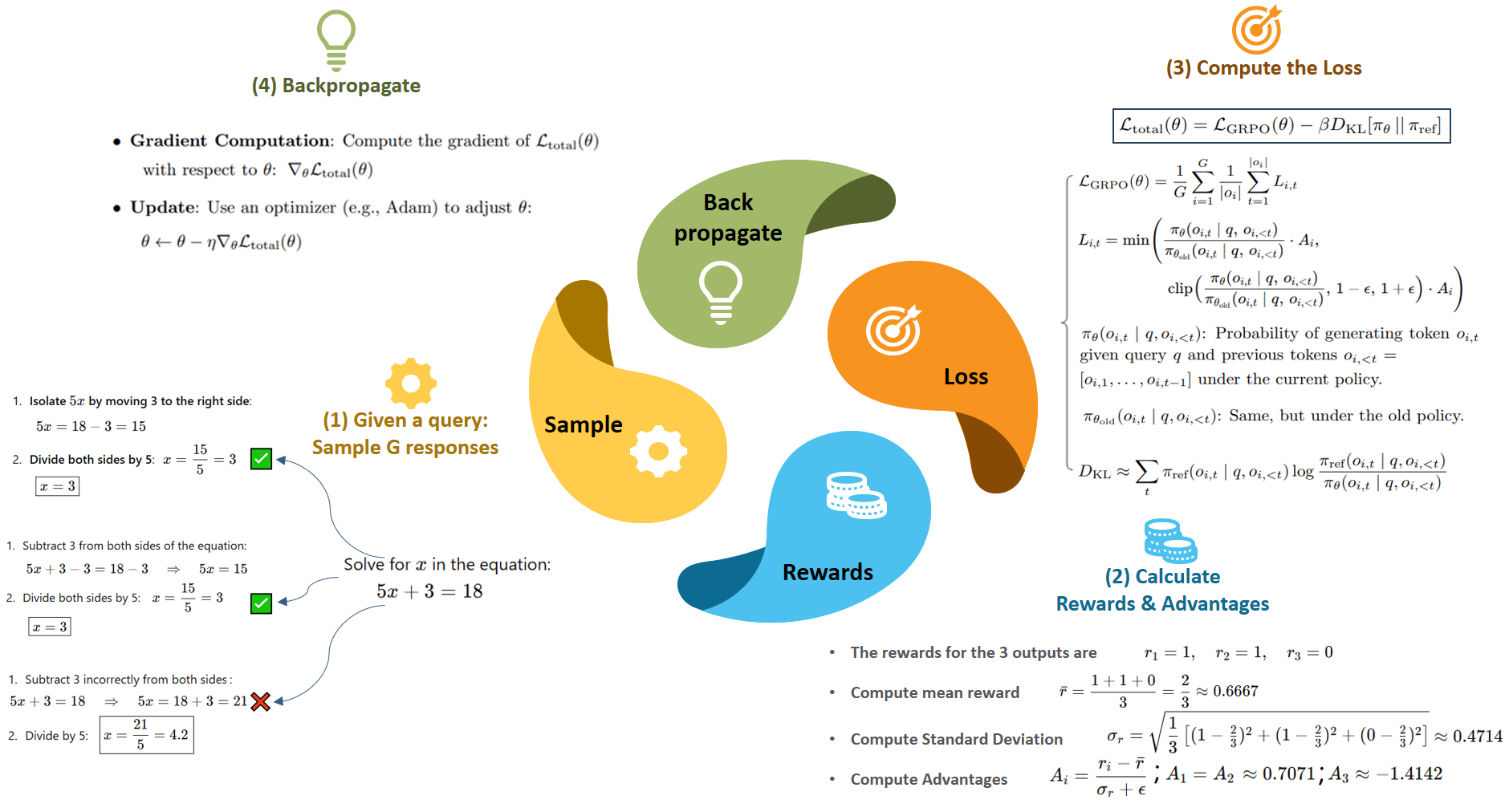
EasyR1's configuration is divided into four top-level blocks: data (data), algorithm (algorithm), worker (parameters for model/training/inference/reward workers), and trainer (training loop control).
Minimal Runnable Configuration
First, the minimal launch command for GeoQA-8K (from the official EasyR1 baseline script):
#!/bin/bash
# examples/baselines/qwen2_5_vl_3b_geoqa8k.sh

set -x
export PYTHONUNBUFFERED=1

MODEL_PATH=Qwen/Qwen2.5-VL-3B-Instruct  # or a local path

python3 -m verl.tainer.main \
    config=examples/config.yaml \
    data.train_files=leonardPKU/GEOQA_8K_R1V@train \
    data.val_files=leonardPKU/GEOQA_8K_R1V@test \
    data.format_prompt=./examples/format_prompt/r1v.jinja \
    worker.actor.model.model_path=${MODEL_PATH} \
    worker.rollout.tensor_parallel_size=1 \
    worker.reward.reward_function=./examples/reward_function/r1v.py:compute_score \
    trainer.experiment_name=qwen2_5_vl_3b_geoqa8k \
    trainer.n_gpus_per_node=8
What does this command do?
config=examples/config.yaml: loads the default configuration file (containing default values for all fields)data.train_files=...: overrides the training data path, loading GeoQA-8K directly from Hugging Face Hubdata.format_prompt=...: specifies the R1-V style prompt templateworker.actor.model.model_path=...: specifies the base modelworker.rollout.tensor_parallel_size=1: no vLLM inference sharding (a 3B model fits on a single GPU)worker.reward.reward_function=...: specifies the reward function file and entry function name (separated by a colon)trainer.n_gpus_per_node=8: uses 8 GPUs
The CLI dot syntax overrides the corresponding fields in the YAML layer by layer. For example, worker.actor.model.model_path corresponds to worker.actor.model.path in the YAML. This design lets you quickly switch experiment configurations without creating new YAML files.
Full Configuration Explained
If you need finer control (such as enabling LoRA, adjusting learning rate, or changing GRPO parameters), you can override via CLI or create your own YAML. Below is a breakdown of the full GeoQA training configuration:
Data configuration (data):
data:
  train_files: leonardPKU/GEOQA_8K_R1V@train # HuggingFace dataset@split
  val_files: leonardPKU/GEOQA_8K_R1V@test
  prompt_key: problem # Column name for questions in the dataset
  answer_key: answer # Column name for answers in the dataset
  image_key: images # Column name for images in the dataset
  max_prompt_length: 2048 # Maximum prompt tokens (including image tokens)
  max_response_length: 2048 # Maximum tokens the model generates
  rollout_batch_size: 512 # Total batch size per rollout step
  format_prompt: ./examples/format_prompt/r1v.jinja # Prompt template
  min_pixels: 262144 # Minimum image pixels (512x512)
  max_pixels: 4194304 # Maximum image pixels (2048x2048)
  filter_overlong_prompts: true # Filter out overly long prompts
rollout_batch_size: 512 means each GRPO update step generates rollout.n responses for 512 prompts. The GeoQA-8K training set has about 8000 samples, so one epoch is about 16 steps.
Algorithm configuration (algorithm):
algorithm:
  adv_estimator: grpo # Use GRPO (group-relative advantage estimation)
  disable_kl: false # Enable KL penalty
  use_kl_loss: true # KL as a loss term (vs reward penalty)
  kl_penalty: low_var_kl # Low-variance KL estimator
  kl_coef: 1.0e-2 # KL penalty coefficient
low_var_kl is a lower-variance KL estimation method, more stable than standard KL. kl_coef=0.01 is EasyR1's default, smaller than PPO's typical value (0.05), because GRPO's within-group normalization already has a regularization effect.
Worker configuration (worker):
worker:
  actor:
    global_batch_size: 128 # Mini-batch size for PPO updates
    micro_batch_size_per_device_for_update: 1 # Micro batch per GPU
    max_grad_norm: 1.0 # Gradient clipping
    padding_free: true # Padding-free training, saves computation
    clip_ratio_low: 0.2 # PPO clip lower bound
    clip_ratio_high: 0.3 # PPO clip upper bound (asymmetric clipping)
    model:
      model_path: Qwen/Qwen2.5-VL-3B-Instruct
      enable_gradient_checkpointing: true # Gradient checkpointing, saves memory
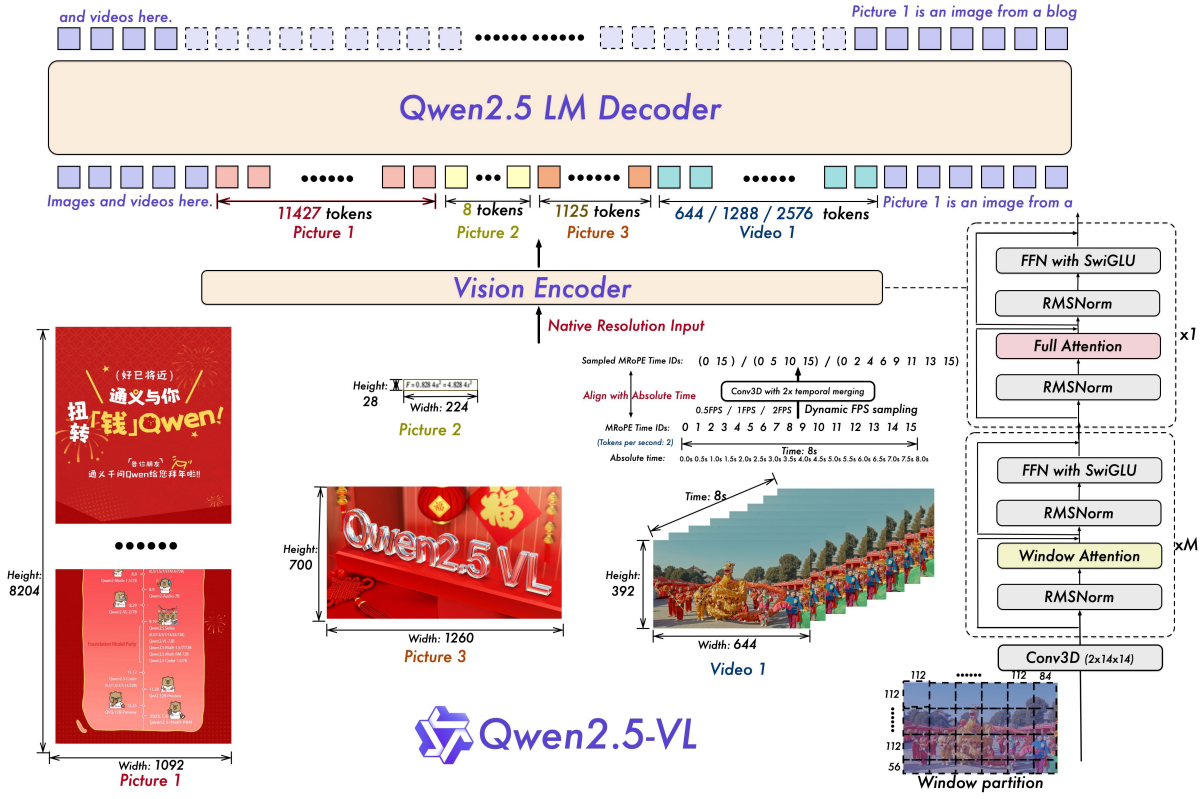
      freeze_vision_tower: false # Whether to freeze the vision encoder
      lora:
        rank: 0 # 0 = full-parameter training; >0 enables LoRA
        alpha: 64
        target_modules: all-linear # Apply LoRA to all linear layers
        exclude_modules: .*visual.* # But exclude the vision encoder
    optim:
      lr: 1.0e-6 # Learning rate (VLM RL typically 1e-6 ~ 5e-6)
      strategy: adamw # Optimizer

  rollout:
    n: 5 # Generate 5 responses per prompt (GRPO group size)
    temperature: 1.0 # Generation temperature
    top_p: 1.0 # Top-p sampling
    tensor_parallel_size: 1 # vLLM tensor parallelism
    gpu_memory_utilization: 0.6 # vLLM GPU memory utilization ratio

  reward:
    reward_function: ./examples/reward_function/r1v.py:compute_score
    # Before the colon is the file path; after the colon is the function name
Rationale for several key configuration choices:
rollout.n=5: generate 5 responses per prompt for within-group comparison. This is the core of GRPO -- the relative advantage of 5 responses is more stable than absolute reward. You can increase to 8 or 16 for more stable advantage estimates, but memory and inference time also grow linearlyclip_ratio_low/high = 0.2/0.3: asymmetric clipping -- tolerance for policy degradation (0.2) is lower than tolerance for improvement (0.3), preventing training collapsefreeze_vision_tower: false: the vision encoder also participates in updates. For a task like geometry reasoning that requires precise visual understanding, freezing the vision encoder may limit the model's ability to learn new visual patternslora.rank=0: default is full-parameter training. If memory is insufficient, change torank=16orrank=32to enable LoRA, combined withtarget_modules: all-linearandexclude_modules: .*visual.*, applying LoRA only to the language model portion
Training control (trainer):
trainer:
  total_epochs: 15 # Number of training epochs
  val_freq: 5 # Validate every 5 steps
  val_before_train: true # Run one validation round before training (to get baseline)
  save_freq: 5 # Save checkpoint every 5 steps
  save_limit: 3 # Keep at most 3 checkpoints
  find_last_checkpoint: true # Automatically resume from latest checkpoint
  logger: ['console', 'wandb'] # Logging backends
  project_name: easy_r1 # WandB project name
  experiment_name: qwen2_5_vl_3b_geoqa8k # Experiment name
  nnodes: 1 # Number of nodes
  n_gpus_per_node: 8 # GPUs per node
LoRA Configuration (Saving Memory)
If you only have 1-2 GPUs with 24GB, you can enable LoRA to train larger models:
python3 -m verl.tainer.main \
    config=examples/config.yaml \
    data.train_files=leonardPKU/GEOQA_8K_R1V@train \
    data.val_files=leonardPKU/GEOQA_8K_R1V@test \
    data.format_prompt=./examples/format_prompt/r1v.jinja \
    worker.actor.model.model_path=Qwen/Qwen2.5-VL-7B-Instruct \
    worker.actor.model.lora.rank=16 \
    worker.actor.model.lora.alpha=64 \
    worker.actor.model.lora.target_modules=all-linear \
    worker.actor.model.lora.exclude_modules=".*visual.*" \
    worker.actor.model.freeze_vision_tower=true \
    worker.rollout.tensor_parallel_size=1 \
    worker.reward.reward_function=./examples/reward_function/r1v.py:compute_score \
    trainer.n_gpus_per_node=2 \
    trainer.experiment_name=qwen2_5_vl_7b_geoqa8k_lora
Key changes:
lora.rank=16: enables LoRA, reducing trainable parameters to about 0.1%freeze_vision_tower=true: freezes the vision encoder (recommended when using LoRA, to avoid vision encoder degradation)exclude_modules=".*visual.*": LoRA is only applied to the language model portion, leaving the vision encoder untouched
Start Training
Single Machine, Multiple GPUs
The simplest way to start -- run the baseline script directly:
bash examples/baselines/qwen2_5_vl_3b_geoqa8k.shOr use CLI overrides (suitable for quick hyperparameter tuning):
python3 -m verl.tainer.main \
    config=examples/config.yaml \
    data.train_files=leonardPKU/GEOQA_8K_R1V@train \
    data.val_files=leonardPKU/GEOQA_8K_R1V@test \
    data.format_prompt=./examples/format_prompt/r1v.jinja \
    worker.actor.model.model_path=Qwen/Qwen2.5-VL-3B-Instruct \
    worker.rollout.tensor_parallel_size=1 \
    worker.reward.reward_function=./examples/reward_function/r1v.py:compute_score \
    trainer.experiment_name=my_geoqa_exp \
    trainer.n_gpus_per_node=8
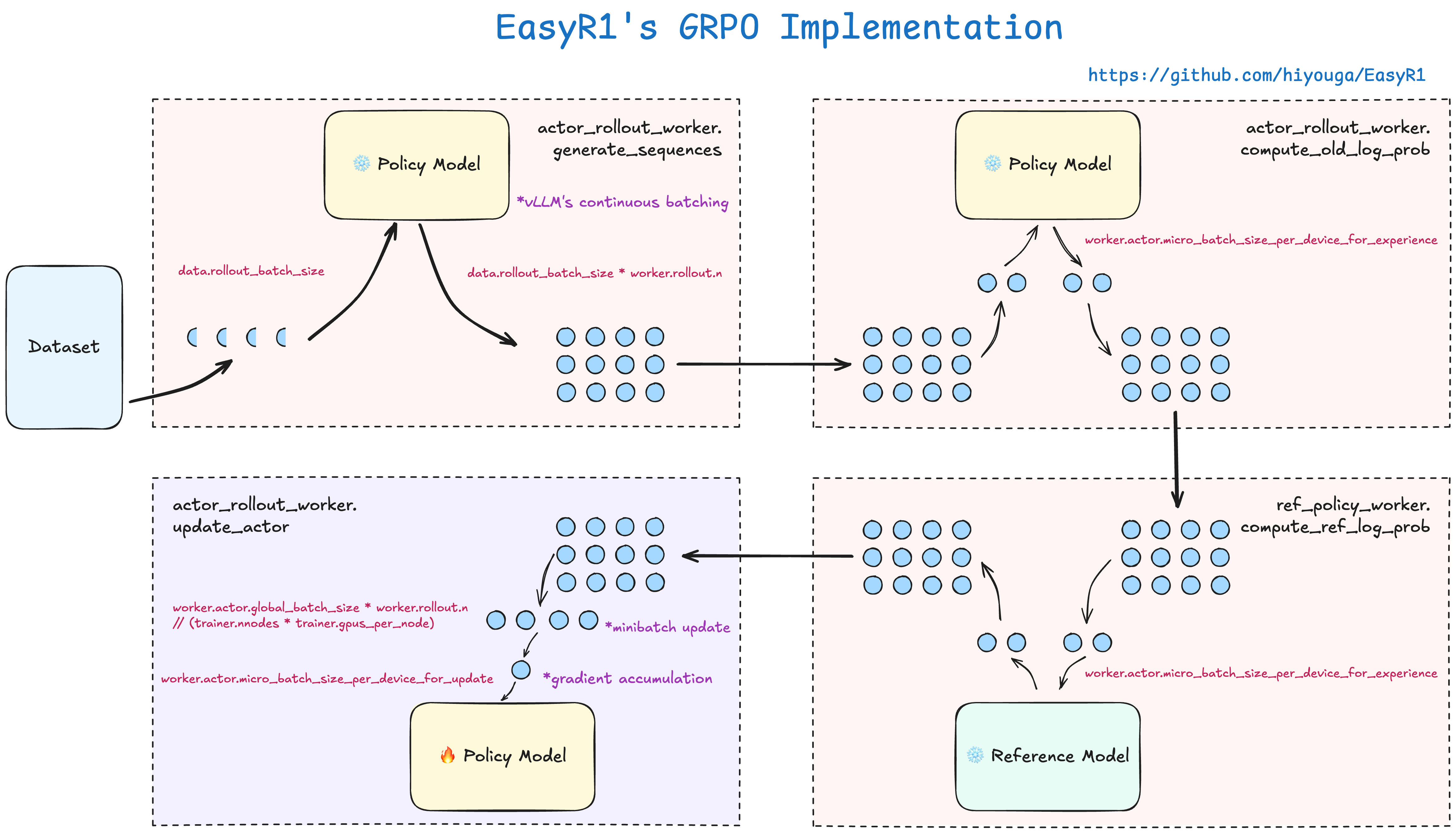
Ray is automatically initialized inside main.py -- you do not need to manually start a Ray cluster. EasyR1's Runner schedules actor workers (training) and rollout workers (inference) on Ray remote actors, sharing model weights on the same set of GPUs via HybridEngine to avoid doubling memory usage.
Multiple Machines, Multiple GPUs
If you need to train across multiple machines:
# Node 1 (head node)
ray start --head --port=6379 --dashboard-host=0.0.0.0

# Node 2+ (worker nodes)
ray start --address=<head_node_ip>:6379

# Verify cluster status
ray status

# Run training on the head node
python3 -m verl.tainer.main \
    config=examples/config.yaml \
    data.train_files=leonardPKU/GEOQA_8K_R1V@train \
    data.val_files=leonardPKU/GEOQA_8K_R1V@test \
    data.format_prompt=./examples/format_prompt/r1v.jinja \
    worker.actor.model.model_path=Qwen/Qwen2.5-VL-7B-Instruct \
    worker.rollout.tensor_parallel_size=4 \
    worker.reward.reward_function=./examples/reward_function/r1v.py:compute_score \
    trainer.nnodes=2 \
    trainer.n_gpus_per_node=8 \
    trainer.experiment_name=qwen2_5_vl_7b_geoqa8k_multinode
Key distributed parameters:
trainer.nnodes=2: tells the framework there are 2 nodesworker.rollout.tensor_parallel_size=4: vLLM inference uses 4-GPU tensor parallelismworker.actor.ulysses_size=1: Ulysses sequence parallelism degree (can be increased for long sequences)
Training Output
After training starts, the terminal outputs key metrics:
[Step 1]  train | reward/overall=0.28 | reward/format=0.45 | reward/accuracy=0.11 | kl=0.000 | loss=2.34
[Step 5]  val   | reward/overall=0.35 | reward/format=0.52 | reward/accuracy=0.18
[Step 6]  train | reward/overall=0.41 | reward/format=0.61 | reward/accuracy=0.21 | kl=0.003 | loss=1.89
[Step 10] val   | reward/overall=0.53 | reward/format=0.68 | reward/accuracy=0.38
...
Each step outputs three groups of metrics:
reward/overall: the total reward used by GRPO,0.5 * accuracy + 0.5 * formatreward/format: format reward -- whether the model answers in<thinkutan>/<answer>formatreward/accuracy: accuracy reward -- whether the answer matches the ground truth
If WandB is also enabled (trainer.logger includes "wandb"), these metrics are automatically uploaded and you can view curves on the WandB dashboard.
Training Metric Analysis

Reading the Reward Curve
A typical training curve on GeoQA-8K goes through three phases:
Phase 1: Learning format (steps 1-30). format quickly rises to 0.8+, while accuracy barely moves. The model first learns "how to answer" -- outputting in the <thinkutan>...<answer>... format, but the answer content is still wrong. This is because format reward is easier to obtain than accuracy reward -- as long as the output structure is correct, you get points.
Phase 2: Learning content (steps 30-100). accuracy starts rising, while format stays high. The model begins using the reasoning process to derive correct answers. In this phase, the growth of overall mainly comes from the contribution of accuracy.
Phase 3: Slow improvement (steps 100+). accuracy growth slows, indicating the model has hit a bottleneck -- the remaining errors may be due to insufficient visual encoding capability (diagrams too complex, angles too small to see clearly), and such errors are difficult to fix through RL.
Typical Answer Changes
Before training (reward/overall ≈ 0.0):
12No reasoning process, no format tags, and the answer may also be wrong.
Phase 1 (reward/overall ≈ 0.5, format ≈ 1.0, accuracy ≈ 0.0):
<thinkutan>Based on diagram analysis</thinkutan><answer>8</answer>The format is correct (the <thinkutan>/<answer> structure is complete), but the reasoning content is superficial and the answer is guessed.
Phase 2 (reward/overall ≈ 0.7, format ≈ 1.0, accuracy ≈ 0.4):
<thinkutan>Observing the diagram, the diagonals of parallelogram ABCD divide the figure into four triangles.
Because the diagonals bisect each other, the four triangles have equal areas.
The shaded region contains two triangles, with a total area of 24 cm²,
so the shaded area is 12 cm².</thinkutan><answer>12</answer>
The reasoning process is complete and the answer is correct.
KL Divergence Monitoring
KL values continue to grow but at a decelerating rate, indicating the model is deviating from the initial policy but not losing control. If KL suddenly spikes (e.g., jumping from 0.01 to 0.1), the learning rate may be too large -- you need to decrease worker.actor.optim.lr or increase algorithm.kl_coef.
EasyR1 defaults to the low_var_kl estimator, which has lower variance than standard KL estimation, producing smoother curves.
Custom Reward Functions
If you want to adjust the reward based on your own requirements, you only need to write a Python file. The framework conventions are very simple:
# my_reward.py

from typing import Any

REWARD_NAME = "my_geoqa"     # Name shown in logs
REWARD_TYPE = "batch"        # "batch" for batch processing or "sequential" for one-by-one


def compute_score(
    reward_inputs: list[dict[str, Any]], **kwargs
) -> list[dict[str, float]]:
    """
    Each item in reward_inputs contains:
    - response: str        Model-generated answer
    - response_length: int Token count
    - ground_truth: str    The answer field from the dataset

    The returned dict must contain an "overall" key (total reward used by GRPO).
    Other keys are auxiliary metrics that will be logged.
    """
    scores = []
    for reward_input in reward_inputs:
        response = reward_input["response"]
        gt = reward_input["ground_truth"]

        # Your scoring logic
        accuracy = 1.0 if check_answer(response, gt) else 0.0
        format_score = check_format(response)

        scores.append({
            "overall": 0.7 * accuracy + 0.3 * format_score,
            "accuracy": accuracy,
            "format": format_score,
        })
    return scores
Then point to this file in the configuration:
worker.reward.reward_function=./my_reward.py:compute_scoreTwo modes for REWARD_TYPE:
"batch": the function receiveslist[dict]and returnslist[dict]. Suitable for scenarios requiring batch processing (e.g., calling a GPU-based reward model)"sequential": the function receives a singledictand returns a singledict. The framework calls it one at a time. Suitable for simple rule rewards (like r1v.py)
**kwargs receives extra parameters configured in worker.reward.reward_function_kwargs in the YAML. For example, r1v.py's format_weight is passed in this way.
Checkpoints and Model Export
During training, EasyR1 periodically saves checkpoints to checkpoints/<project_name>/<experiment_name>/global_step_N/. The checkpoint contains actor model weights, optimizer state, and trainer state.
To convert the checkpoint to standard Hugging Face format:
python scripts/model_merger.py \
    --model_path Qwen/Qwen2.5-VL-3B-Instruct \
    --adapter_checkpoint checkpoints/easy_r1/qwen2_5_vl_3b_geoqa8k/global_step_15/actor \
    --output_path ./merged_geoqa_model
After conversion, you can load it with standard transformers:
from transformers import Qwen2_5_VLForConditionalGeneration

model = Qwen2_5_VLForConditionalGeneration.from_pretrained(
    "./merged_geoqa_model"
)
If LoRA was enabled, model_merger.py automatically merges the LoRA weights back into the base model. The merged model is used exactly the same way as a full-parameter trained model, with no dependency on any LoRA inference library.
Comparison with the Handwritten Experiment in Section 11.1
| Aspect | 11.1 Handwritten GRPO | EasyR1 in this section |
|---|---|---|
| Dataset | Synthetic geometric shapes (self-generated) | GeoQA-8K real dataset |
| Inference engine | model.generate() one-by-one | vLLM continuous batching |
| Training engine | Single-GPU AdamW | veRL + FSDP |
| Memory optimization | None | LoRA + padding-free + gradient checkpointing |
| Distributed | Single process | Ray cluster, supports multi-node multi-GPU |
| Logging | WandB / TensorBoard / SwanLab | |
| Training scale | ~500 samples, a few minutes | ~8K samples, several hours |
The workload EasyR1 saves you: vLLM rollout integration, FSDP distributed training scheduling, LoRA implementation, gradient accumulation and memory optimization, checkpoint management and recovery. You only need to focus on two core decisions: (1) which dataset to use, and (2) how to design the reward function. These two decisions are precisely the factors that most affect results in VLM RL training.
Extension Experiments
- Change the base model: compare training curves for Qwen2.5-VL-3B versus 7B. The 3B model has a smaller vision encoder, so its geometry reasoning accuracy ceiling may be lower
- Change the algorithm: switch
algorithm.adv_estimatorfromgrpotodapoorreinforce_plus_plusand compare training curves. EasyR1 supports 7 algorithms, requiring only a one-line config change - LoRA vs full-parameter ablation: for the same model, compare
lora.rank=0(full-parameter) vslora.rank=16(LoRA), examining accuracy and memory usage - Adjust
format_weight: change from the default 0.5 to 0.1 or 0.9, observing the impact of format reward weight on reasoning quality - Increase rollout.n: increase from 5 to 8 or 16, observing whether GRPO's within-group advantage estimation becomes more stable
Chapter Summary
This chapter progressed from "hand-writing a few dozen lines of GRPO to train a VLM" to "using an industrial framework to train on a real dataset." Along the way we discussed the credit assignment challenge in visual rewards, strategies for dealing with visual hallucinations, and frontier frameworks from VisPlay to multimodal agents.
The core observation running through the entire chapter: VLM RL's algorithmic skeleton is still GRPO/PPO, but multimodal input transforms reward design from "judge whether the answer is correct" to "judge whether the model actually looked at the image, understood it, and reasoned based on visual evidence." This shift makes reward function design the most critical engineering decision in VLM RL -- more important than model selection, training parameters, or distributed strategy.
Returning to the EasyR1 experiment in this section: r1v.py's reward has only two components (format + accuracy), but this precisely illustrates that good reward design does not need to be complex -- what it needs is an accurate understanding of the task's essence. The core of geometry reasoning is the three steps "look at the image → reason → answer," and the reward corresponds to the quality of each of these steps.